
The complete beginner-to-advanced guide to writing prompts that actually get the image you want — every time. Includes 12 copy-paste templates for marketing, social media, product photography, and more.
🔍 QUICK ANSWER — What is prompt engineering for AI image generation? Prompt engineering is the skill of writing text descriptions that get AI image tools to produce exactly what you want. A good prompt follows a layered structure: Subject + Action + Environment + Style + Mood + Lighting + Composition + Technical Quality. The more specific and concrete each layer, the better the output. Negative prompts — a second input listing things you do not want — are equally important for eliminating common AI failure modes like distorted faces, blurry details, and unwanted styles. This guide covers the full formula with 12 copy-paste templates and real before-and-after examples. |
Why Your Prompt Is 80% of the Result
Most people blame the AI when they get a bad image. In reality, the AI is doing exactly what you asked — you just did not ask for the right thing.
Text-to-image AI does not read between the lines. It does not know that when you said "a cosy cafe" you meant "warm Edison bulb lighting, exposed brick walls, a steaming latte on a wooden table." It takes the statistical average of every cafe image it has ever seen and produces something generic.
Prompt engineering is the skill of translating your mental image into the specific, concrete language the AI needs to produce it. It is not difficult — but it does follow a learnable structure. Once you understand that structure, your results improve immediately and dramatically.
📊 Impact of Prompt Quality: Analysis across prompt engineering communities consistently shows that adding specific style, lighting, and composition descriptors to a basic subject prompt improves user satisfaction with AI outputs by 50–70%. The single most impactful addition? A lighting style. It is also the most commonly omitted element in beginner prompts. |
The 8-Layer Prompt Formula
Every great prompt is built from the same eight layers. You do not need all eight for every image — but knowing each one and adding them deliberately is what separates good prompts from great ones.
# | Layer | What It Covers | Examples |
1 | Subject | The main focus — who or what is in the image | A golden retriever puppy |
2 | Action / State | What the subject is doing or how it exists | sitting, jumping, asleep in a sunbeam |
3 | Environment | Where the scene takes place | in a sunlit forest clearing, on a rainy cobblestone street |
4 | Style / Medium | What the image looks like visually | photorealistic, oil painting, flat design, 3D render |
5 | Mood / Atmosphere | The emotional quality of the image | peaceful, dramatic, nostalgic, energetic |
6 | Lighting | How the scene is lit — the single biggest quality lever | golden hour, soft diffused light, dramatic studio lighting |
7 | Composition | Camera angle, framing, and perspective | close-up portrait, wide establishing shot, bird's eye view |
8 | Technical Quality | Resolution and render quality descriptors | 8K, ultra-detailed, sharp focus, high resolution |
📐 THE MASTER FORMULA: [Subject] + [Action] + [Environment] + [Style] + [Mood] + [Lighting] + [Composition] + [Technical Quality] EXAMPLE (all 8 layers): "A golden retriever puppy [1] sitting in a pile of autumn leaves [2] in a sunlit forest clearing [3], photorealistic, 35mm film [4], warm and joyful [5], soft golden hour light [6], close-up portrait, shallow depth of field [7], 8K, ultra-detailed, sharp focus [8]" |
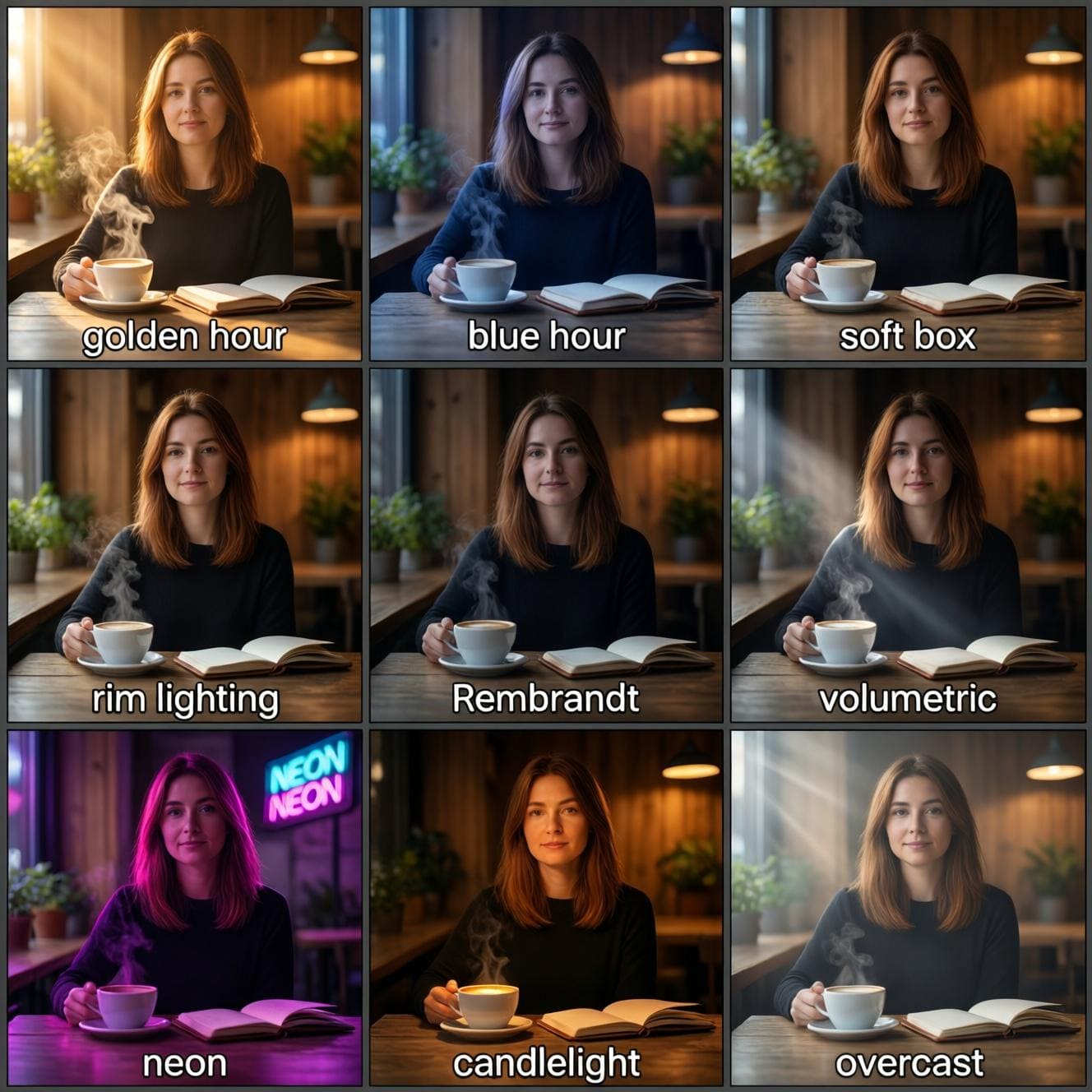
Layer 6 Deep Dive — Lighting (Your Biggest Quality Lever)
Of all eight layers, lighting has the single biggest impact on perceived image quality and realism. Human eyes evolved to interpret lighting as the primary cue for understanding a scene — and AI models have learned the same associations from billions of photographs.
Adding a lighting style costs you three words in your prompt. The quality improvement is immediate and dramatic. Here are the most useful lighting descriptors with what each one does:
Category | Modifier Words | What It Does to the Image |
Natural Light | golden hour, golden light | Warm, orange-tinted light from low sun — romantic, cinematic, high quality feel |
blue hour, dusk light | Cool blue ambient light just after sunset — moody, atmospheric, fashion-forward | |
soft diffused light, overcast | Even, shadow-free lighting — clean product shots, portraits, food photography | |
harsh midday sun | Strong contrast, sharp shadows — dramatic outdoor scenes, gritty realism | |
Studio Light | soft box lighting | Even, professional studio look — ideal for portraits and product photography |
rim lighting, backlit | Light from behind subject creating a glowing outline — cinematic and dramatic | |
dramatic studio lighting | Strong directional light with deep shadows — luxury brands, editorial fashion | |
Rembrandt lighting | Classic portrait technique — one lit side, triangular shadow on the other | |
Atmospheric | volumetric light, god rays | Visible light beams through mist or fog — magical, cinematic, fantasy |
neon lighting | Coloured artificial light — cyberpunk, nightlife, urban scenes | |
candlelight, firelight | Warm flickering orange glow — intimate, romantic, historical | |
bioluminescent, glowing | Self-illuminated organic light — fantasy, nature, sci-fi environments |
Style & Medium Modifiers — The Full Cheat Sheet
Specifying a style or medium is the second most impactful thing you can do after lighting. Without it, the AI picks whatever the statistics of your prompt most strongly suggest — usually a generic internet-photo look. Here is a comprehensive reference:
Category | Modifier Words | What It Does to the Image |
Photography | photorealistic, DSLR photography | Realistic photo look — best for lifestyle, portrait, and product content |
35mm film, film grain | Warm, analogue photo aesthetic — nostalgic, editorial, authentic | |
editorial photography | Magazine-style, high-concept — fashion, lifestyle, brand campaigns | |
macro photography | Extreme close-up — insects, textures, food detail, jewellery | |
Illustration | digital illustration | Clean modern illustration — explainer content, tech brands, apps |
watercolour illustration | Soft, hand-painted look — artisan brands, wellness, children's content | |
flat design, flat illustration | Simple, minimal vector style — icons, infographics, modern branding | |
comic book art, graphic novel | Bold lines and flat colour — entertainment, youth brands | |
Fine Art | oil painting | Rich texture, classical depth — luxury brands, fine art, heritage products |
impressionist painting | Loose, expressive brushstrokes — artistic, emotive, lifestyle brands | |
concept art | Detailed world-building illustration — game development, sci-fi, fantasy | |
charcoal sketch | Rough, textured drawing look — artisanal brands, editorial, design concepts | |
3D & CGI | 3D render, Cinema 4D | Clean computer-generated image — tech products, architecture, visualisations |
3D clay render | Soft, matte toy-like look — playful brands, product design, social content | |
Octane render, Blender | Photorealistic CGI — product shots, architecture, automotive | |
isometric illustration | Angled top-down 3D — maps, infographics, tech explainers |
Negative Prompts — Your Second Most Powerful Tool
A negative prompt is a second text input where you list everything you do not want to appear in your image. Think of your main prompt as telling the AI what to paint — and your negative prompt as telling it what paint to avoid.
Most consumer tools support negative prompts. In DALL-E 3, you add them conversationally ("make sure there is no text in the image"). In Ideogram, Seedream, and Agent-Pix-It there is a dedicated negative prompt field. Understanding when and how to use them removes the most common AI image failures.
The Universal Negative Prompt — Use This Every Time
📋 UNIVERSAL NEGATIVE PROMPT (paste into any tool): blurry, out of focus, low quality, pixelated, compression artifacts, watermark, text overlay, signature, border, frame, overexposed, underexposed, oversaturated, washed out, low resolution, grainy, noisy, distorted, deformed, ugly |
Targeted Negative Prompts by Use Case
Use Case | Recommended Negative Prompt |
Portrait / People | distorted face, asymmetrical eyes, extra limbs, extra fingers, missing fingers, fused fingers, bad anatomy, crossed eyes, uneven skin, blurry face, cartoon, anime, painting (if realism required) |
Product Photography | shadow, unwanted reflection, background clutter, dust, scratches, cropped product, distorted proportions, text on product, low quality packaging, blurry label |
Landscape / Nature | people, buildings, signs, power lines, vehicles, aircraft, urban elements (if natural scene required), overcast sky (if blue sky required) |
Graphic Design / Poster | extra text, misspelled words, garbled letters, unreadable fonts, cluttered layout, overlapping elements, low contrast, illegible hierarchy |
Food Photography | insects, mould, dirty surfaces, utensils (if not required), human hands, artificial garnish, overcooked, unappetising colours, plastic wrap |
Fashion / Apparel | wrinkled fabric, stains, bad fit, ghost mannequin errors, floating garments, extra limbs, mismatched items, background clutter |
12 Copy-Paste Prompt Templates
These templates are ready to use. Replace the bracketed sections with your specific details. Each template is formatted to work across DALL-E 3, Seedream, Ideogram, Nano Banana 2, and Agent-Pix-It.
Marketing & Social Media
📋 TEMPLATE 1 — Instagram Product Post [Product type] on [surface material], [background colour] background, [lighting style] light from [direction], [colour palette] palette, minimalist editorial style, Instagram-ready, commercial product photography, high resolution, sharp focus EXAMPLE: "Artisan ceramic coffee mug on natural oak surface, soft white background, diffused natural light from the left, cream and sage green palette, minimalist editorial style, Instagram-ready, commercial product photography, high resolution, sharp focus" NEGATIVE: blurry, watermark, cluttered background, text overlay, shadow, distorted proportions |
📋 TEMPLATE 2 — Facebook / Google Ad Creative [Scene or product], [mood/energy], [colour palette] colour scheme, bold graphic design, suitable for [platform] ad, [aspect ratio] format, professional marketing creative, high contrast, visually striking EXAMPLE: "Premium gym supplements flat lay, high energy athletic mood, black and electric blue colour scheme, bold graphic design, suitable for Facebook ad, 1200x628 landscape format, professional marketing creative, high contrast, visually striking" NEGATIVE: cluttered, low contrast, watermark, blurry, unprofessional, amateur |
📋 TEMPLATE 3 — Instagram Stories (9:16 Vertical) [Subject] in [setting], [mood] atmosphere, [colour palette] tones, vertical 9:16 format, lifestyle photography, [lighting style], Instagram Stories-ready, emotionally engaging, high resolution "Young woman practising yoga on a rooftop at sunrise, peaceful and energised atmosphere, coral and warm gold tones, vertical 9:16 format, lifestyle photography, soft morning backlight, Instagram Stories-ready, emotionally engaging, high resolution" NEGATIVE: horizontal composition, blurry, low energy, crowded frame, text overlay |
📋 TEMPLATE 4 — Email Newsletter Header (Wide) [Scene/theme] in [setting], [mood] atmosphere, [colour palette] palette, wide landscape format 3:1 ratio, no text, [lighting style], editorial photography style, suitable for email header, high resolution EXAMPLE: "Autumnal forest path with golden leaves falling, peaceful and nostalgic atmosphere, burnt orange and deep green palette, wide landscape format 3:1 ratio, no text, soft diffused overcast light, editorial photography style, suitable for email header, high resolution" NEGATIVE: people, text overlay, watermark, cluttered foreground, dark shadows |
Product Photography
📋 TEMPLATE 5 — E-Commerce Product Shot (White Background) [Product name], [material/finish description], centred on pure white background, professional studio lighting, soft box light from upper left, commercial product photography, e-commerce ready, sharp focus, high resolution, no shadow, no reflection EXAMPLE: "Luxury dark glass perfume bottle, gold metallic cap and engraved label, centred on pure white background, professional studio lighting, soft box light from upper left, commercial product photography, e-commerce ready, sharp focus, high resolution, no shadow, no reflection" NEGATIVE: shadow, reflection, dust, scratches, background clutter, blurry, low quality |
📋 TEMPLATE 6 — Lifestyle Product Shot [Product] being used by [person description] in [setting], [time of day], [mood] atmosphere, [colour palette] tones, lifestyle photography, natural and authentic, editorial quality, [lighting style], high resolution EXAMPLE: "Reusable water bottle being held by an active woman in her 30s in a mountain trail setting, early morning, fresh and motivated atmosphere, forest green and sky blue tones, lifestyle photography, natural and authentic, editorial quality, soft morning sunlight, high resolution" NEGATIVE: staged, artificial, stock photo look, watermark, blurry |
Graphic Design & Branding
📋 TEMPLATE 7 — Logo Concept (Use with Ideogram or Agent-Pix-It) Minimalist [brand type] logo, [icon description], [colour palette] colour scheme, clean sans-serif / serif wordmark, white background, professional brand identity, vector style, simple and memorable EXAMPLE: "Minimalist wellness brand logo, abstract lotus flower mark with flowing lines, sage green and cream colour scheme, clean modern sans-serif wordmark, white background, professional brand identity, vector style, simple and memorable" NEGATIVE: complex, cluttered, multiple colours, drop shadow, gradient (if flat required), raster texture |
📋 TEMPLATE 8 — Promotional Poster (Use with Ideogram) Bold promotional poster for [event/product/offer], headline text: '[your headline]', [colour palette] colour scheme, [mood] energy, [style] design aesthetic, clear visual hierarchy, professional layout, print-ready EXAMPLE: "Bold promotional poster for a summer music festival, headline text: 'Sounds of Summer 2026', vibrant coral and electric yellow colour scheme, euphoric festival energy, retro 70s design aesthetic, clear visual hierarchy, professional layout, print-ready" NEGATIVE: illegible text, cluttered, low contrast, blurry, amateur design |
Portrait & People
📋 TEMPLATE 9 — Professional Headshot / Portrait [Gender/age descriptor] [profession], [expression], [clothing description], [setting], [lighting style], editorial portrait photography, [camera specs], high resolution, sharp focus EXAMPLE: "Confident female tech executive in her late 30s, warm approachable expression, navy blazer and white shirt, modern glass office background softly blurred, Rembrandt lighting, editorial portrait photography, 85mm lens equivalent, high resolution, sharp focus" NEGATIVE: distorted face, extra fingers, asymmetrical eyes, unnatural skin, blurry, low quality, overexposed |
📋 TEMPLATE 10 — Lifestyle / Diversity Content [Number] diverse [age/demographic] people [activity], in [setting], [mood] atmosphere, candid and authentic feel, lifestyle photography, [lighting style], editorial quality, high resolution EXAMPLE: "Three diverse women in their 20s laughing together over coffee, in a bright modern cafe, warm and genuine atmosphere, candid and authentic feel, lifestyle photography, soft natural window light, editorial quality, high resolution" NEGATIVE: staged, stock photo look, unnatural poses, watermark, blurry, low quality |
Concepts & Abstract Visuals
📋 TEMPLATE 11 — Blog Article Header / Concept Visual Abstract concept illustration representing [topic/idea], [visual metaphor description], [colour palette] palette, [style: digital illustration / 3D render / etc.], wide 16:9 landscape format, no text, modern and clean, suitable for blog header, high resolution EXAMPLE: "Abstract concept illustration representing artificial intelligence and creativity, glowing neural network intertwined with paintbrush strokes, deep blue and violet palette, digital illustration style, wide 16:9 landscape format, no text, modern and clean, suitable for blog header, high resolution" NEGATIVE: text overlay, watermark, cluttered, literal representation, photorealistic (if illustration required) |
📋 TEMPLATE 12 — Agent-Pix-It Creative Brief Template // Use this when submitting a brief to Agent-Pix-It // Write in plain language — the AI handles the prompt engineering BRAND: [Your brand name and brief description] GOAL: [What this image is for — Instagram post / ad / email header / etc.] SUBJECT: [What should be in the image] MOOD: [How should it feel — professional / playful / luxurious / energetic] COLOUR PALETTE: [Your brand colours or preferred palette] FORMAT: [Square 1:1 / Landscape 16:9 / Vertical 9:16 / Wide 3:1] SPECIAL REQUIREMENTS: [Text in image? Multiple variants? Batch of X images?] EXAMPLE BRIEF: BRAND: Lumis Skincare — clean beauty brand, minimalist aesthetic GOAL: 5 Instagram posts for summer collection launch SUBJECT: Product flat lays featuring SPF serum and moisturiser MOOD: Fresh, luxurious, sun-drenched COLOUR PALETTE: Cream, soft coral, warm gold FORMAT: Square 1:1 SPECIAL REQUIREMENTS: Consistent style across all 5 images, no text overlay |
Before & After — Real Prompt Transformations
Here are five real-world transformations showing exactly how adding layers improves the output. Each example targets a different marketing use case.
Example 1 — Social Media Product Post
❌ Weak Prompt | ✅ Optimised Prompt |
A coffee cup on a table | Artisan ceramic pour-over coffee cup on a weathered oak table, warm amber tones, golden hour light streaming from the left, minimalist lifestyle photography, shallow depth of field, 35mm film aesthetic, Instagram-ready, high resolution |
Why it's weak: No environment, no style, no lighting — produces a generic stock photo | Why it works: Environment + lighting + style + medium specified — produces a premium lifestyle image |

Example 2 — Portrait for Brand Campaign
❌ Weak Prompt | ✅ Optimised Prompt |
A businesswoman smiling | Confident South Asian businesswoman in her early 40s, genuine warm smile, structured navy blazer, modern minimalist office environment softly blurred background, soft box studio lighting, editorial portrait photography, 85mm lens, sharp focus, high resolution |
Why it's weak: No age, ethnicity, clothing, setting, or lighting — produces a generic, often stereotypical result | Why it works: Specific, inclusive, detailed — produces an editorial-quality campaign-ready portrait |

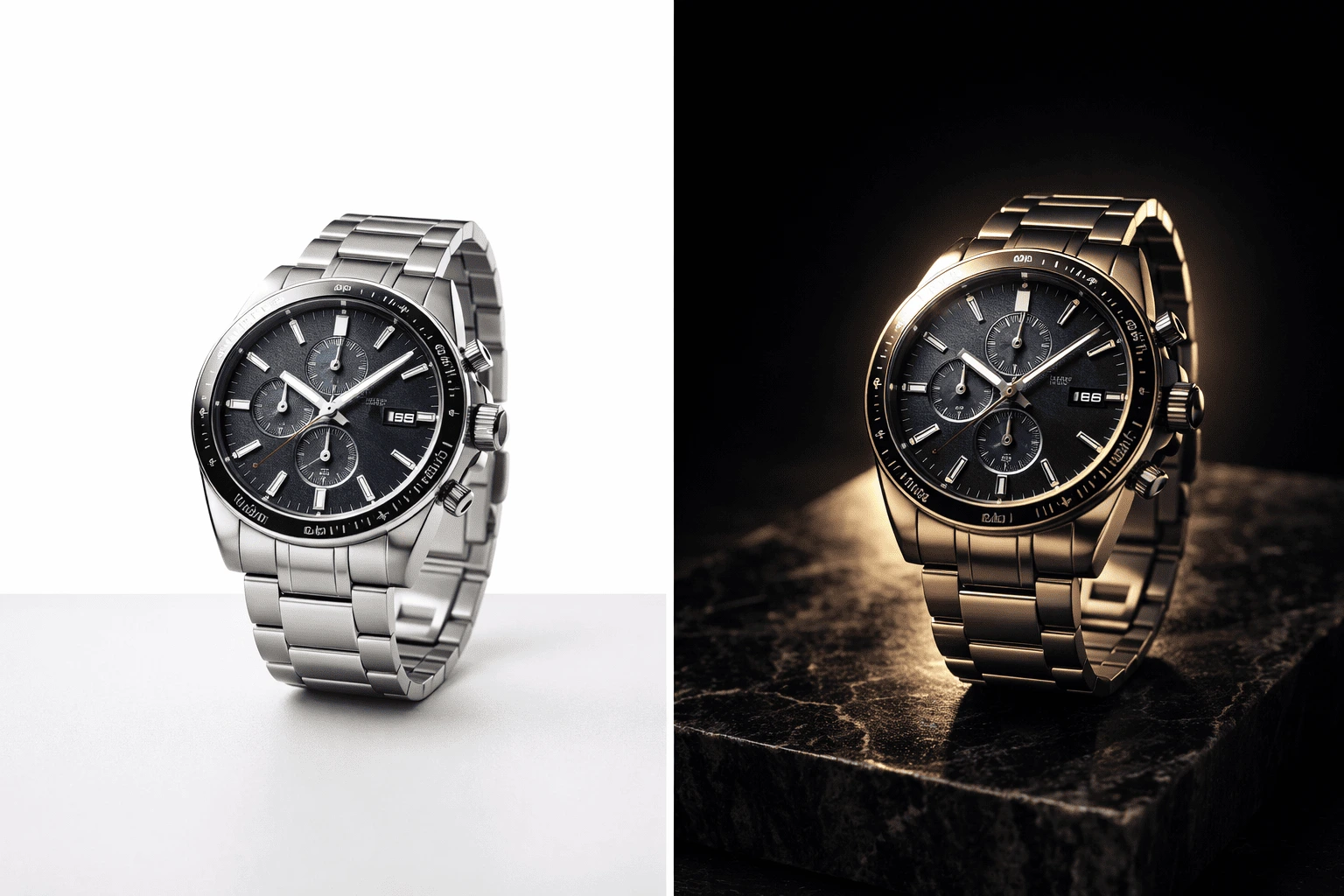
Example 3 — E-Commerce Product
❌ Weak Prompt | ✅ Optimised Prompt |
A watch on a surface | Luxury stainless steel chronograph watch on a black marble slab, dramatic studio lighting with rim light from behind, deep shadow on left side, commercial product photography, macro close-up on watch face, 8K, ultra-detailed, sharp focus |
Why it's weak: No material, no surface, no lighting, no composition — produces a flat, low-quality result | Why it works: Material + surface + lighting direction + composition all specified — produces a luxury ad-ready shot |
Example 4 — Blog Header Concept
❌ Weak Prompt | ✅ Optimised Prompt |
Artificial intelligence | Abstract digital illustration of a glowing neural network forming a human brain silhouette, electric blue and deep navy palette, clean and modern tech aesthetic, wide 16:9 landscape format for blog header, no text, minimal and striking, high resolution |
Why it's weak: Completely abstract — produces a random, unusable image with no visual direction | Why it works: Visual metaphor + palette + format + purpose all specified — produces a usable, branded concept visual |

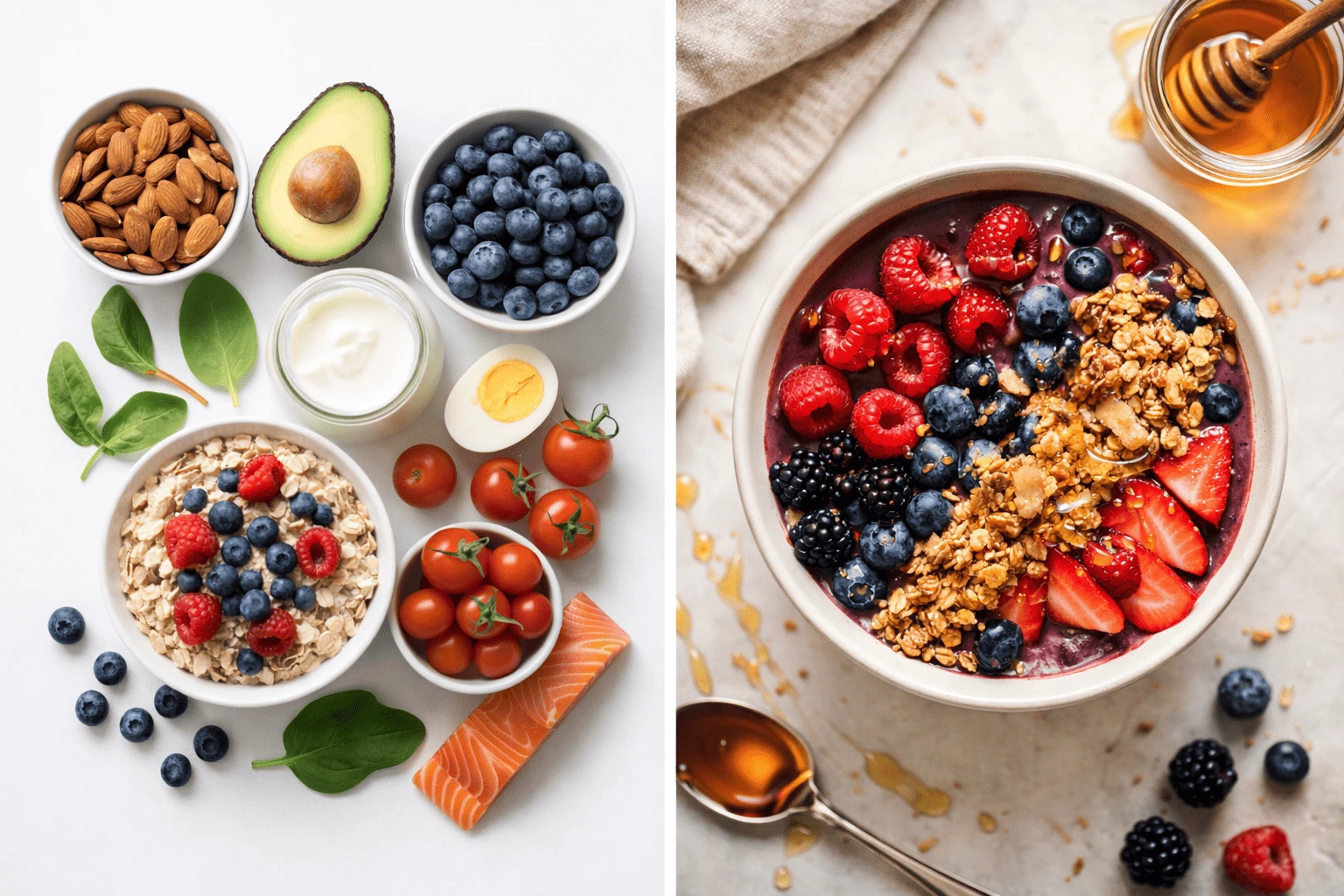
Example 5 — Instagram Story
❌ Weak Prompt | ✅ Optimised Prompt |
Healthy food | Vibrant overhead flat lay of a nourishing breakfast bowl — acai, fresh berries, granola, honey drizzle — on a white ceramic surface, bright natural window light, fresh and joyful mood, food photography, editorial lifestyle, vertical 9:16 format, sharp focus |
Why it's weak: No specific food, no arrangement, no setting, no lighting — produces an arbitrary generic food image | Why it works: Every element specified — produces a shareable, high-energy lifestyle food image ready for Stories |
10 Most Common Prompt Mistakes (And How to Fix Them)
Common Mistake | What Happens | The Fix |
Too vague | Generic, average outputs with no personality | Add environment, lighting, and style — minimum 3 layers beyond the subject |
Prompt stuffing (30+ words) | Diluted outputs — model spreads attention too thin | Stick to 8–15 high-impact descriptors that work together coherently |
Contradictory instructions | Confused outputs — model tries to combine incompatible ideas | Review prompt for conflicts: 'dark moody AND bright cheerful' cannot both be true |
No lighting specified | Flat, lifeless images regardless of subject quality | Always add a lighting style — it is the single highest-leverage addition you can make |
No style or medium | Generic internet-photo aesthetic by default | Always specify: photorealistic / oil painting / digital illustration / 3D render |
Abstract adjectives only | Unmeasurable instructions — 'beautiful', 'amazing', 'perfect' | Describe what beautiful looks like: 'warm golden light, soft bokeh, harmonious palette' |
Wrong aspect ratio | Poorly composed image for intended platform | Always match aspect ratio to use: 1:1 for feed, 9:16 for stories, 16:9 for headers |
No negative prompt | Common failure modes appear: distorted faces, blurry areas, watermarks | Add the universal negative prompt as standard — takes 5 seconds, prevents most failures |
Subject only, no context | Subject floating in ambiguous empty space | Add environment and composition: 'in a sun-drenched Mediterranean courtyard, wide establishing shot' |
Forgetting the technical tail | Lower quality outputs even with good description | Always end with: '8K, ultra-detailed, sharp focus, high resolution' or similar |
Tool-Specific Prompting Tips
The 8-layer formula works across all tools — but each platform has quirks worth knowing.
DALL-E 3 — Prompting Tips
DALL-E 3 understands natural language exceptionally well — write conversationally rather than comma-stringing keywords
Use ChatGPT to iterate: generate an image, then say 'make the background warmer and remove the text' — it maintains context
For text in images: be very specific — 'sign reading exactly: OPEN DAILY 9AM–6PM' — DALL-E 3 handles this better than competitors
Avoid the word 'not' in positive prompts — say 'clear blue sky' rather than 'no clouds' — use the negative prompt field for exclusions
Google Nano Banana 2 — Prompting Tips
Shorter, cleaner prompts often work better with Nano Banana 2 than extremely long keyword strings
Reference real-world specifics: 'in the style of a National Geographic cover photo' or 'shot on a Sony A7R V' — Nano Banana's grounding layer understands these references
For trend-based content, reference current aesthetics naturally: 'soft minimalist aesthetic trending in 2026 wellness brands'
Use conversational language in the Gemini app for easy iteration — ask follow-up questions to refine
Seedream — Prompting Tips
Seedream responds exceptionally well to photography-specific language — always specify camera style, lens type, and lighting direction
For batch generation: use a consistent style anchor phrase across all prompts in the batch to ensure visual coherence
Avoid prompts requiring in-image text — Seedream's text rendering is weak; use Ideogram for those tasks
For 4K output: add '4K resolution, maximum detail, ultra-sharp' — Seedream is one of the few tools where these actually increase output resolution
Ideogram — Prompting Tips
Use Magic Prompt for any brief prompt — it automatically expands and enriches your description, especially helpful for beginners
For text in images: write text exactly as you want it to appear, in quotes — 'bold headline text reading: "Summer Sale 50% Off"'
Specify font style even if you cannot name an exact font: 'clean geometric sans-serif', 'elegant serif script', 'bold condensed display typeface'
Use style reference uploads when you have brand visual examples — Ideogram's reference matching is strong for maintaining brand consistency
Agent-Pix-It — Prompting Tips
Write creative briefs, not technical prompts — Agent-Pix-It is designed to receive plain-language briefs and handle the prompt engineering internally
Specify your deliverable clearly: '5 consistent Instagram posts', '1 wide email header', '3 ad creative variants' — the agent optimises for your exact output format
Include brand context: colour palette, tone of voice, and any style references help the agent select the right model and parameters
Trust the evaluation layer — if an output does not match your brief, use the feedback function rather than rewriting your entire brief from scratch
Frequently Asked Questions
How long should a prompt be?
The sweet spot is 8–15 meaningful descriptors. Short enough that the model can weight each element properly, long enough to specify subject, environment, style, lighting, composition, and quality. Prompts under 5 words produce generic results; prompts over 30 words dilute focus and produce muddled outputs. Quality of descriptors matters far more than quantity.
Do I need different prompts for different tools?
The 8-layer formula works across all tools. The difference is in delivery style: DALL-E 3 prefers conversational sentences; Seedream and Stable Diffusion respond well to comma-separated keyword strings; Ideogram works best with clear text specifications; Agent-Pix-It prefers plain-language briefs. The underlying information you are communicating is the same — only the presentation adapts.
What is the most common mistake beginners make?
Forgetting lighting. It is the single element with the biggest impact on perceived image quality, and it is the element most commonly omitted by beginners. Any subject — a person, a product, a landscape — looks dramatically better with a specified lighting style. Add three words and the quality improvement is immediate: 'soft golden hour light', 'dramatic studio lighting', or 'soft diffused natural light'.
Can I use the same prompt across different tools?
Yes, and it is actually a useful exercise. Using the same prompt across DALL-E 3, Seedream, and Ideogram shows you their default stylistic tendencies and helps you understand which tool to reach for depending on the visual outcome you need. Our Blog 3 tool comparison does exactly this with 4 marketing prompts.
What does 'seed' mean and should I use it?
The seed is a number that sets the starting point for the random noise the diffusion model begins with. Using the same seed with the same prompt produces an identical or near-identical image. Changing the seed with the same prompt produces a different composition. Seeds are useful when you find a composition or facial feature you like and want to iterate on it — lock the seed, then change one prompt element at a time to see its isolated effect.
Do negative prompts work the same way on all tools?
The concept is universal but the implementation varies. Stable Diffusion, Ideogram, and Seedream have dedicated negative prompt input fields. DALL-E 3 accepts negative instructions conversationally within your prompt or follow-up messages. Google Nano Banana 2 handles exclusions through natural language in the main prompt. Agent-Pix-It automatically generates negative prompts internally based on your brief — you rarely need to specify them manually.
Continue the Series
🏠 |
⚙️ |
⚔️ |
🤖 |
⚖️ | Blog 6: AI Image Copyright & Legal Guide |