
Grok Imagine Is Now Live on Kumba
Big news for creators, marketers, designers, and anyone who works with visuals — Grok Imagine is officially available on Kumba. You can now generate high-quality AI images directly from Kumba's AI model hub, with no external tools or subscriptions needed.
Grok Imagine is the image generation model developed by xAI, the artificial intelligence company founded by Elon Musk. It is built to produce fast, expressive, and visually accurate outputs from simple text prompts — and it is already turning heads in the AI design community for one key reason: it genuinely understands text.
For creators who have struggled with AI image tools that mangle words in their designs, or marketers who need clean, branded visuals at scale, Grok Imagine offers something meaningfully different. It renders readable typography, handles multiple artistic styles, and delivers outputs that feel both intentional and production-ready.
With Kumba now offering Grok Imagine as part of its AI model lineup, users can generate images for social media, marketing, product design, concept art, and more — directly from their workflow.
What Is Grok Imagine?
Grok Imagine is an AI-powered image generation model developed by xAI. It is designed to convert natural language text prompts into high-fidelity visual outputs, and it also supports image-to-image transformation — meaning users can upload an existing image and generate new variations from it.
Unlike some earlier AI image models that prioritized photorealism above all else, Grok Imagine is built with creative versatility in mind. It supports a wide range of visual styles, from hyper-realistic photography-style renders to stylized illustrations, concept art, and graphic design outputs.
What sets Grok Imagine apart, and what has made it particularly popular among designers and marketers, is its strong typography handling. Most AI image models struggle to produce readable text within images — but Grok Imagine generates clean, legible text that works in posters, advertisements, social media banners, and branded content.
Key capabilities of Grok Imagine at a glance:
Multi-style image generation — from photorealistic to artistic
High visual fidelity and detail
Strong, accurate typography generation
Text-to-image and image-to-image workflows
Fast generation speeds for rapid creative iteration
Key Features of Grok Imagine
Here is a detailed look at what Grok Imagine can do — and why each feature matters for real-world creative and business use cases.
Text-to-Image Generation
The most fundamental feature of Grok Imagine is its ability to turn a written description into a complete image. Users type a prompt — anything from a simple scene description to a detailed creative brief — and the model generates a visual that matches the intent.
This capability is immediately useful for:
Marketing teams who need quick ad concepts or campaign visuals
Designers who want to explore visual directions before committing to full production
Content creators who need original images for blogs, newsletters, or social media
Entrepreneurs who want product mockups, brand visuals, or landing page graphics without hiring a designer
Image-to-Image Creation
Grok Imagine also supports image-to-image generation. Users can upload an existing image and instruct the model to transform it — applying a new style, changing the mood or lighting, generating creative variations, or adapting it for a different use case.
This is particularly useful for:
Brand teams that want to adapt existing visuals into new styles
Photographers or illustrators looking to explore alternative versions of their work
E-commerce businesses that need multiple product presentation options from a single base image
Precise Text Rendering
This is one of Grok Imagine's most talked-about strengths. Generating readable, accurate text inside AI images has historically been a major weak point for most models. Grok Imagine addresses this directly, producing clean and legible typography that integrates naturally into the design.
Practical applications include:
Event posters with titles, dates, and location text
Social media graphics with headlines or promotional copy
Advertisement creatives with product names or slogans
Brand assets with logo text or taglines
Multiple Aspect Ratios
Grok Imagine supports a range of aspect ratios so outputs are immediately optimized for their intended platform or format:
1:1 — Instagram posts, profile images, product thumbnails
16:9 — YouTube thumbnails, website banners, presentation slides
9:16 — Instagram Reels, TikTok, YouTube Shorts, Stories
4:5 — Instagram feed posts, Pinterest graphics
This flexibility eliminates the need to crop or reformat images after generation, saving time in production workflows.
Fast Image Generation
Speed matters in creative workflows. Grok Imagine is built for rapid outputs, meaning users can iterate through multiple prompt variations, style options, and compositions quickly — without long wait times breaking their creative momentum.
What Makes Grok Imagine Unique
There are now dozens of AI image generation models available, so what genuinely differentiates Grok Imagine? Several factors make it stand out as a preferred choice for design-oriented and commercial use cases.
Expressive Artistic Range: Grok Imagine does not default to a single visual style. It handles everything from cinematic photography aesthetics to flat design illustration, concept art, and editorial graphics. This versatility means a single tool can serve multiple creative disciplines.
Best-in-Class Typography: As noted, text rendering is where many models fall short. Grok Imagine treats text within images as a design element, not an afterthought — making it genuinely useful for marketing and branding work.
Balanced Realism and Creativity: Many models skew either toward hyper-realistic outputs or toward stylized art. Grok Imagine strikes a balance, offering outputs that feel grounded and believable even when the subject matter is fantastical or conceptual.
Design and Marketing Alignment: The model's output quality is calibrated for professional use cases. Outputs are polished, consistent, and ready to drop into real campaigns, decks, or content pieces.
Use Cases for Grok Imagine
Grok Imagine is a versatile tool with applications across industries and creative disciplines. Here are the primary use cases where it delivers the most value.
Marketing and Social Media
For marketing teams and social media managers, Grok Imagine can significantly accelerate content production:
Generate ad creatives for digital campaigns in multiple formats
Create eye-catching Instagram and Facebook visuals from brand briefs
Design campaign graphics with accurate text, logos, and visual themes
Produce A/B test variations of visual concepts quickly
Product and E-Commerce Images
E-commerce brands can use Grok Imagine to generate professional product presentation assets:
Product mockups showing items in lifestyle or studio settings
Promotional imagery for seasonal campaigns or launch announcements
Background generation for product photography

Join our newsletter for regular updates on AI, digital marketing and growth!
Posters and Graphic Design
Designers and creative teams can use Grok Imagine for a wide range of graphic design applications:
Event posters with legible text, dates, and creative visuals
Brand identity explorations and mood boards
Creative artwork for editorial, packaging, or publication use
Concept Art and Storytelling
Writers, game designers, filmmakers, and illustrators will find Grok Imagine valuable for visual development:
Character design and visual concept exploration
Scene and environment generation for scripts or storyboards
World-building visuals for games, fiction, and creative projects
How to Use Grok Imagine on Kumba
Getting started with Grok Imagine on Kumba is straightforward. Follow these steps to generate your first image:
Open Kumba and navigate to the AI image models section.
Select Grok Imagine from the list of available models.
Enter a descriptive text prompt in the input field — or upload an existing image for image-to-image generation.
Choose your preferred aspect ratio (1:1, 16:9, 9:16, or 4:5) based on where you plan to use the image.
Hit Generate and wait a few moments for your image to be created.
Download your image directly or continue iterating with refined prompts.
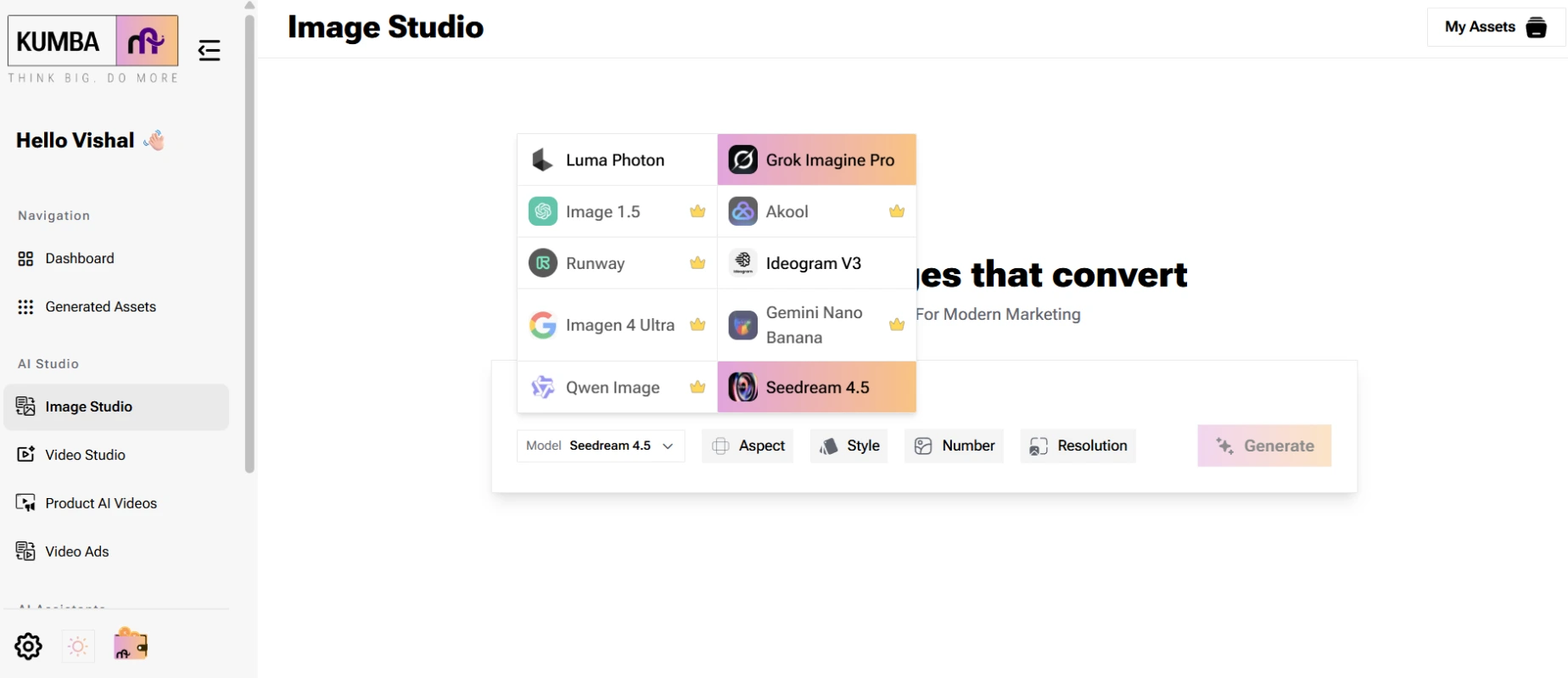
Pro Tip: The more descriptive and specific your prompt, the more targeted your output. Include details about style, lighting, mood, composition, and color palette for best results.
Example Prompts to Try on Grok Imagine
Not sure where to start? Here are some ready-to-use prompt examples that showcase the range of Grok Imagine's capabilities:
"Cinematic sci-fi city at sunset with neon lights, reflective wet streets, 16:9 widescreen"
"Luxury product photography of a perfume bottle on white marble with soft shadows and golden lighting"
"Minimalist event poster with bold sans-serif typography, event title 'Future Fest 2026', date and venue"
"Futuristic robot illustration in vibrant comic book style, dynamic pose, bright color palette"
"Instagram food photo of a matcha latte in a white ceramic cup, sunlit coffee shop background, 1:1"
"Abstract brand identity concept with geometric shapes, modern color palette of navy and gold"
"E-commerce lifestyle photo of a running shoe on urban pavement, motion blur, energetic mood"
These prompts demonstrate how Grok Imagine handles everything from commercial photography aesthetics to illustration, poster design, and product visuals.
Grok Imagine vs Other AI Image Models
The AI image generation landscape is competitive. Here is how Grok Imagine compares against other leading models across the criteria that matter most to designers and marketers.
Feature | Grok Imagine | OpenAI Image | Ideogram AI | Luma AI |
Text Rendering | ⭐ Excellent | Good | ⭐ Excellent | Average |
Style Variety | ⭐ High | High | Moderate | High |
Speed | ⭐ Fast | Moderate | Moderate | Fast |
Design Capability | ⭐ Strong | Moderate | Strong | Moderate |
Realism Balance | Balanced | Realistic | Stylized | Realistic |
Key takeaway: Grok Imagine's combination of strong text rendering and design-ready outputs makes it a top choice for commercial and marketing use cases. While models like OpenAI's image generation offer strong realism and Luma AI excels in video-adjacent visual work, Grok Imagine fills a specific and valuable gap — expressive, typography-capable, design-friendly image generation.
Why Creators Should Try Grok Imagine
If you create content, run marketing campaigns, design assets, or build products — Grok Imagine on Kumba is worth trying. Here is a quick summary of the core benefits:
Faster Creative Workflow: Generate image concepts in seconds rather than hours. Ideal for rapid iteration and prototyping.Faster Creative Workflow:
Better Typography: Stop struggling with AI-generated text that looks broken or unreadable. Grok Imagine handles it properly.
Platform-Ready Formats: Multiple aspect ratios mean your images are ready for any channel — Instagram, YouTube, ads, or print — without resizing.
Versatile Style Range: One model handles photorealistic, illustrative, and graphic design styles, reducing the need to switch between tools.
No Design Skills Required: Anyone can generate professional-quality visuals with a well-written prompt — no Photoshop or design expertise needed.
Built for Business Use: Clean, polished outputs that are suitable for real campaigns, product pages, and marketing materials.
Start Creating with Grok Imagine on Kumba
Grok Imagine is live on Kumba — and it is free to explore.
Whether you are a marketer building campaign assets, a designer exploring new directions, a content creator looking for original visuals, or a business owner who needs professional imagery without a production budget — Grok Imagine on Kumba gives you everything you need to start creating immediately.
Head to Kumba's AI image model page, select Grok Imagine, write your first prompt, and see what it generates. The best way to understand what this model can do is to try it yourself.
Experiment with different styles, test your typography prompts, and explore the variety of formats it supports. You might be surprised how quickly Grok Imagine becomes a core part of your creative workflow.
→ Try Grok Imagine on Kumba now at kumba.ai/models
Frequently Asked Questions About Grok Imagine
What is Grok Imagine?
Grok Imagine is an AI image generation model developed by xAI. It creates high-quality images from text prompts and supports image-to-image transformations, with particular strength in typography rendering and multi-style visual outputs.
Who developed Grok Imagine?
Grok Imagine was developed by xAI, the artificial intelligence company founded by Elon Musk.
What makes Grok Imagine different from other AI image generators?
Grok Imagine stands out for its precise text rendering within images, making it especially useful for posters, ads, and branded content. It also supports a wide range of artistic styles and delivers fast generation speeds.
What aspect ratios does Grok Imagine support?
Grok Imagine supports 1:1, 16:9, 9:16, and 4:5 aspect ratios, covering all major social media and digital platforms.
How do I use Grok Imagine on Kumba?
Open Kumba's AI image models section, select Grok Imagine, enter a text prompt or upload an image, choose your aspect ratio, and generate your image. Download is available directly from the interface.
Is Grok Imagine good for marketing and commercial use?
Yes. Grok Imagine is particularly well-suited for marketing, advertising, social media graphics, product imagery, and branded content due to its clean outputs, typography support, and design-friendly aesthetic.